Project [02]

Improving user onboarding journey
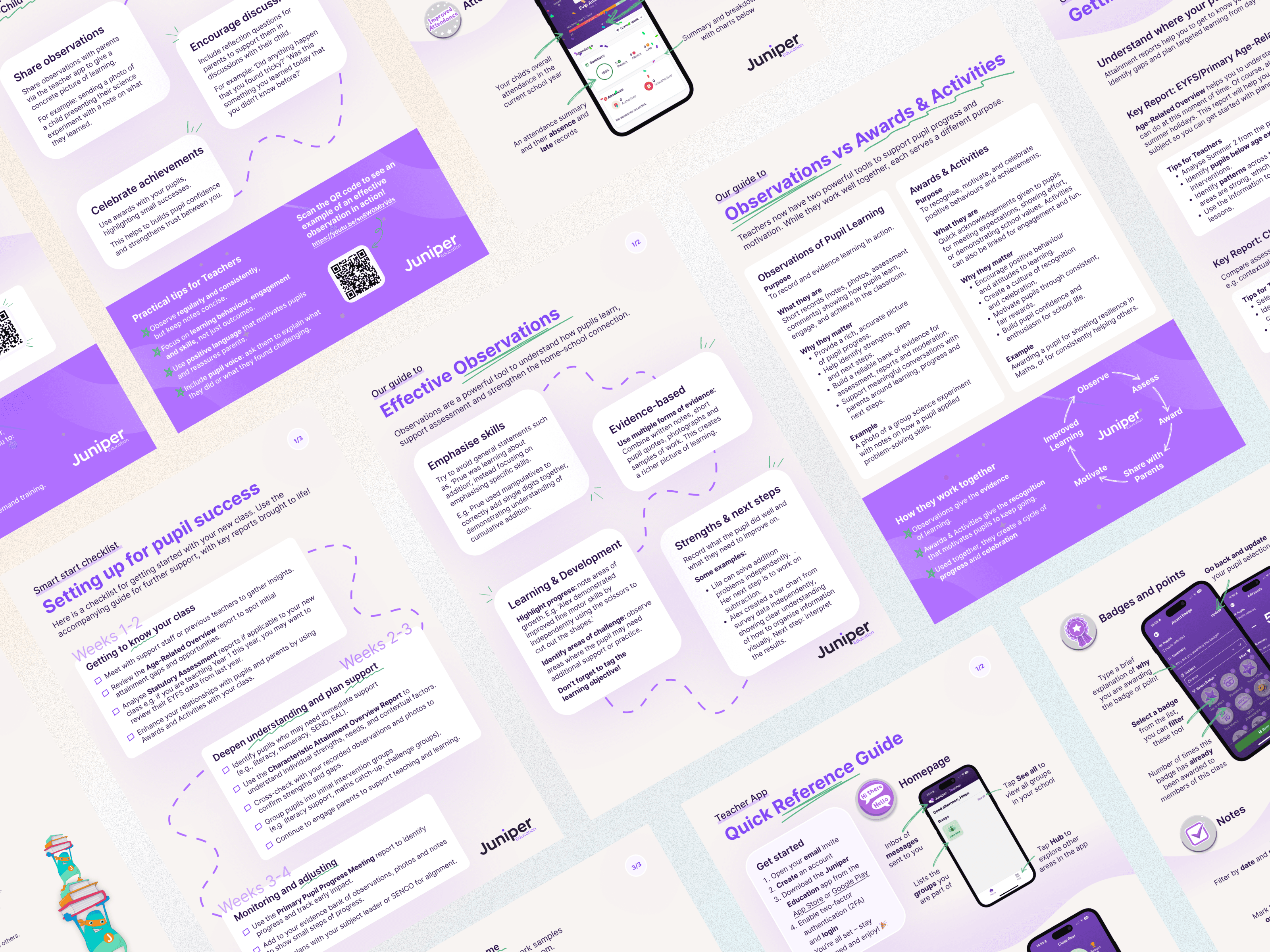
Layout of various print designs for onboarding parents and teachers

Resources for web and mobile product launches

PDF designs for teachers and parents

Project Overview

The focus of this project was to create a seamless onboarding experience ahead of a multi-product and mobile app launch. I addressed technical and UX challenges, redesigned the invitation and verification process, and developed comprehensive onboarding resources to support teachers and parents. The goal was to ensure users received a smooth, engaging, and consistent introduction to the products, leaving a positive first impression.

Problem Statement

2FA Barrier: The existing FusionAuth 2FA method required users to scan a QR code via an authenticator app, which was impossible for mobile app users trying to log in on the same device.

No Onboarding Journey: There was no structured onboarding journey mapped out. HTML email invites lacked engagement and “wow factor,” and no resources were provided to set expectations or support users.

Project

Graphic & UX Design

My Role

Lead Designer

Platforms

Print and Web

Platforms

Print and Web

"I asked Emma, Helen and Stacey to put together some content that would both highlight our new features/products and also support customers with the return to school and parent engagement. No small task!\r\n\r\nThey smashed it ? They worked together to create not one but two amazing sets of resources – great content, great design, delivered on time and with serious wow factor. Brilliant work team"

Persona

Hayley

Maths Teacher

Hayley is a teacher who needs to understand and adopt the new school and parent mobile apps efficiently. She values clarity, guidance, and a smooth setup process so she can focus on teaching and supporting her students.

Age: 45

Tech Proficiency: Moderate

Goals

Complete the onboarding process quickly and confidently.

Access helpful resources to understand features and expectations before using the apps.

Engage with the apps effectively to support her students and communicate with parents.

Frustrations

Confusing or incomplete onboarding that makes it hard to access or understand the apps.

Technical barriers, like authentication methods that don’t work on mobile devices.

Lack of clear guidance or resources to help her make the most of the apps.

Process
[01] User Research

Interviews with internal stakeholders revealed confusion over QR-code-based 2FA on mobile devices.

Surveyed teachers and parents indicated they wanted pre-launch guidance and expectations before accepting invites.

Feedback showed that resource kits and simple walkthroughs significantly improved confidence in using new apps.

[01] User Research

Interviews with internal stakeholders revealed confusion over QR-code-based 2FA on mobile devices.

Surveyed teachers and parents indicated they wanted pre-launch guidance and expectations before accepting invites.

Feedback showed that resource kits and simple walkthroughs significantly improved confidence in using new apps.

[01] User Research

Interviews with internal stakeholders revealed confusion over QR-code-based 2FA on mobile devices.

Surveyed teachers and parents indicated they wanted pre-launch guidance and expectations before accepting invites.

Feedback showed that resource kits and simple walkthroughs significantly improved confidence in using new apps.

[02] Insights

Mobile users struggle with authentication methods designed primarily for desktop workflows.

Providing resources ahead of launch increases user engagement and confidence.

Clear, visually consistent communications improve perceived credibility and create a positive first impression.

[02] Insights

Mobile users struggle with authentication methods designed primarily for desktop workflows.

Providing resources ahead of launch increases user engagement and confidence.

Clear, visually consistent communications improve perceived credibility and create a positive first impression.

[02] Insights

Mobile users struggle with authentication methods designed primarily for desktop workflows.

Providing resources ahead of launch increases user engagement and confidence.

Clear, visually consistent communications improve perceived credibility and create a positive first impression.

[03] Design Solution

Updated the 2FA method in FusionAuth to email verification codes, providing a familiar and mobile-friendly solution.

Designed engaging HTML email invites for each user type, highlighting key benefits and setting expectations.

Created 8 PDF onboarding resource kits for teachers and parents, providing clear guidance and visually consistent materials.

[03] Design Solution

Updated the 2FA method in FusionAuth to email verification codes, providing a familiar and mobile-friendly solution.

Designed engaging HTML email invites for each user type, highlighting key benefits and setting expectations.

Created 8 PDF onboarding resource kits for teachers and parents, providing clear guidance and visually consistent materials.

[03] Design Solution

Updated the 2FA method in FusionAuth to email verification codes, providing a familiar and mobile-friendly solution.

Designed engaging HTML email invites for each user type, highlighting key benefits and setting expectations.

Created 8 PDF onboarding resource kits for teachers and parents, providing clear guidance and visually consistent materials.

[04] Testing & Iteration

2FA verification: tested email verification flow with desktop and mobile users to ensure it worked seamlessly and was understood as a security benefit.

Email design: iterated on email layout and content based on PM and user feedback to ensure clarity, engagement, and consistent branding.

Resource kits: reviewed and refined PDFs with Product Managers and Head of Operations to ensure content accuracy, clarity, and usability for teachers and parents.

[04] Testing & Iteration

2FA verification: tested email verification flow with desktop and mobile users to ensure it worked seamlessly and was understood as a security benefit.

Email design: iterated on email layout and content based on PM and user feedback to ensure clarity, engagement, and consistent branding.

Resource kits: reviewed and refined PDFs with Product Managers and Head of Operations to ensure content accuracy, clarity, and usability for teachers and parents.

[04] Testing & Iteration

2FA verification: tested email verification flow with desktop and mobile users to ensure it worked seamlessly and was understood as a security benefit.

Email design: iterated on email layout and content based on PM and user feedback to ensure clarity, engagement, and consistent branding.

Resource kits: reviewed and refined PDFs with Product Managers and Head of Operations to ensure content accuracy, clarity, and usability for teachers and parents.

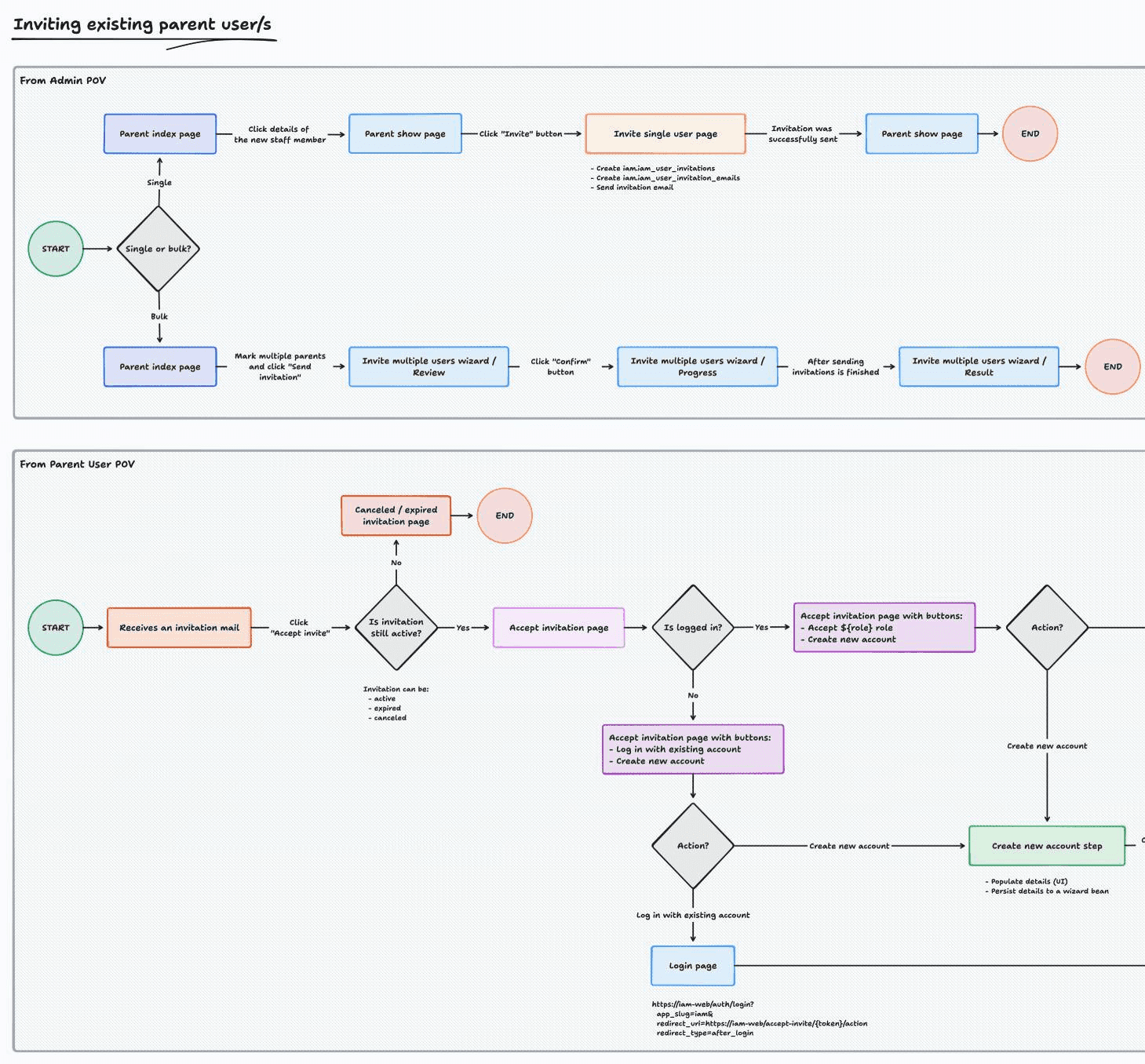
User journey map for parent users
Various print designs for onboarding teachers
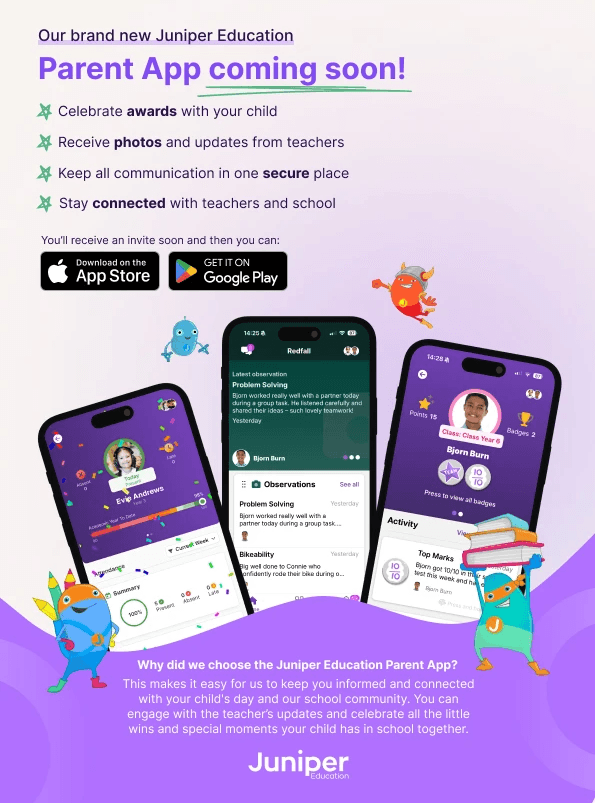
PDF design for schools to send to parents about the new parent app
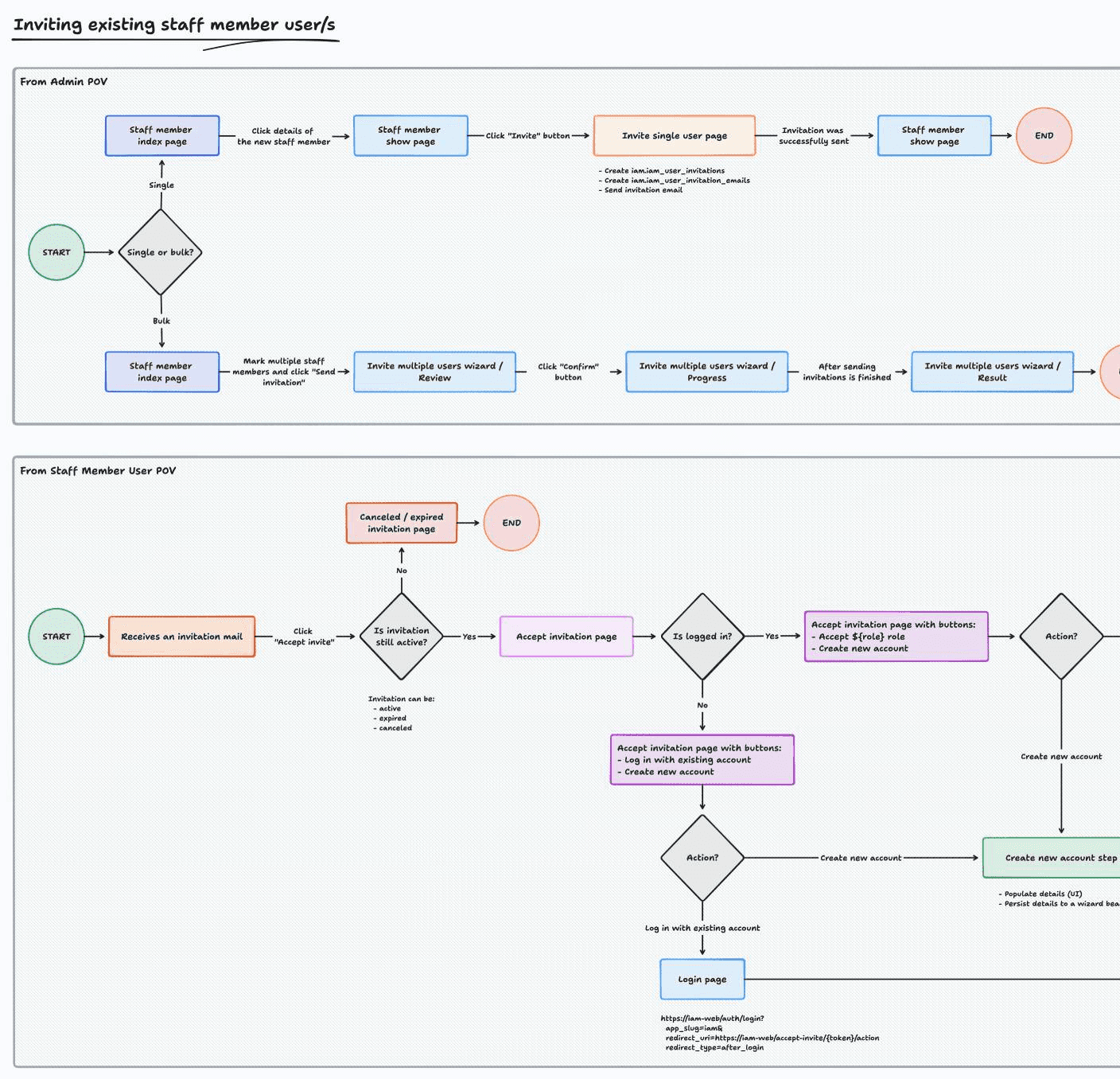
User journey map for teacher users

Outcomes

Smoother onboarding process with reduced friction for both mobile and desktop users.
Positive first impressions and stronger engagement from teachers and parents.
Consistent look and feel across communications and resources, reinforcing credibility and brand trust.

Key Learnings

Mobile-friendly authentication

Ensure all onboarding workflows are accessible on the devices users will actually use.

Mobile-friendly authentication

Ensure all onboarding workflows are accessible on the devices users will actually use.

Mobile-friendly authentication

Ensure all onboarding workflows are accessible on the devices users will actually use.

Early engagement builds buy-in

Pre-launch emails and resources increase user confidence and excitement about new products.

Early engagement builds buy-in

Pre-launch emails and resources increase user confidence and excitement about new products.

Early engagement builds buy-in

Pre-launch emails and resources increase user confidence and excitement about new products.

Collaboration elevates quality

Working closely with PMs, engineers, and operational teams produces accurate, visually compelling, and highly effective onboarding materials.

Collaboration elevates quality

Working closely with PMs, engineers, and operational teams produces accurate, visually compelling, and highly effective onboarding materials.

Collaboration elevates quality

Working closely with PMs, engineers, and operational teams produces accurate, visually compelling, and highly effective onboarding materials.

Select this text to see the highlight effect