Project [01]

Designing the Parent and Teacher Apps
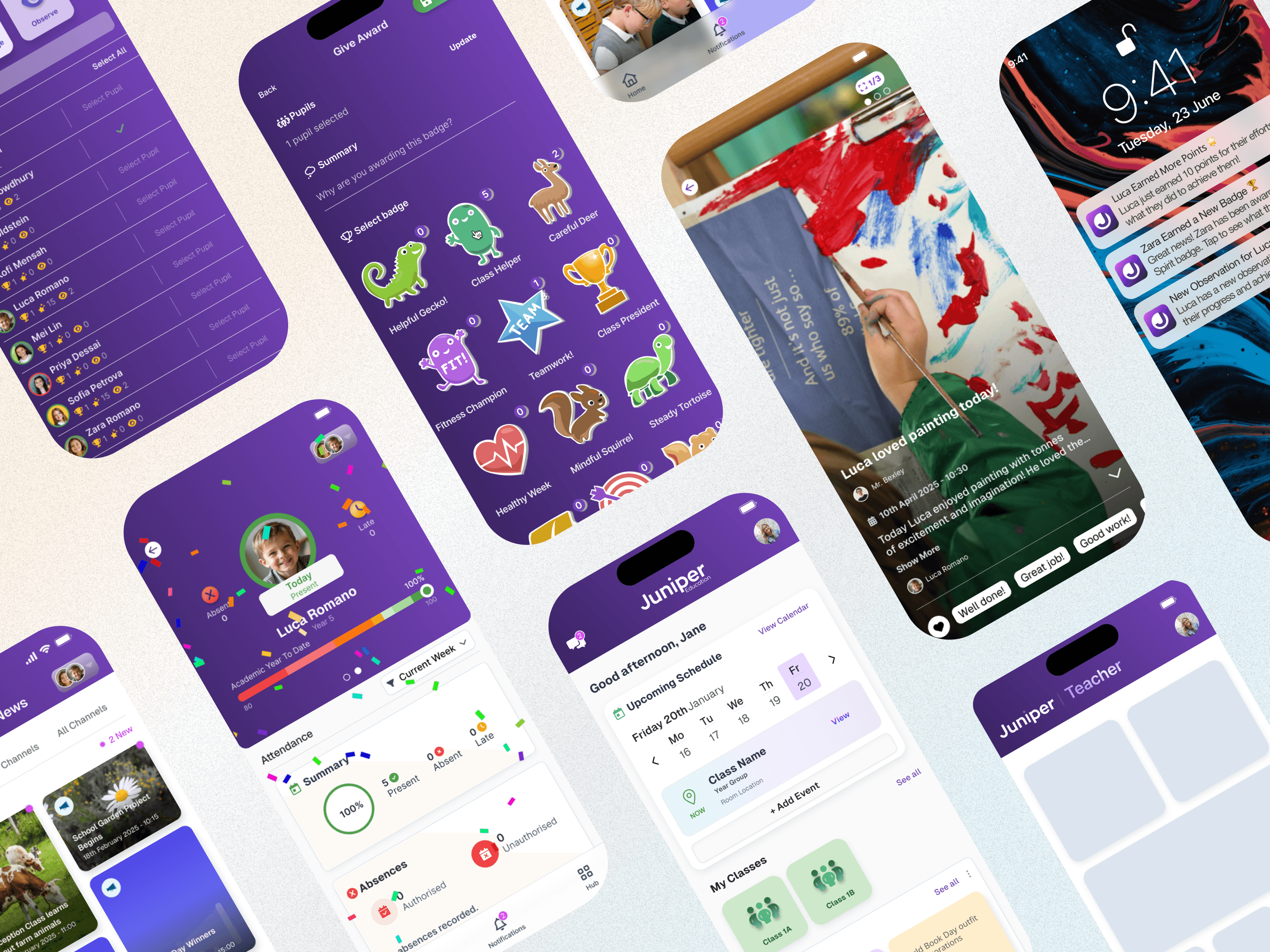
Layout of various mobile app designs for parents and teachers

Building a better connection between schools and parents

Project Overview

Enabling teachers to involve parents in their children's school day – celebrating achievements together.

Problem Statement

We identified four problem areas we needed to try and improve:

  1. Persistent absenteeism

  2. Behaviour challenges

  3. Progress for pupils with SEND

  4. Teacher retention

Designing our new parent and teacher mobile apps directly tackles these four challenges by improving communication, visibility and support. The apps give parents real-time attendance updates and reminders, helping to reduce persistent absenteeism. Behaviour challenges are addressed through instant reporting, consistent feedback and shared strategies between school and home. For pupils with SEND, the apps allow teachers and parents to track individual targets and progress more easily, ensuring tailored support. Finally, by streamlining admin tasks and improving collaboration, the apps reduce workload and stress for staff, contributing to better teacher retention.

Project

Native Mobile App UI & UX

My Role

Lead Designer

Platforms

Desktop, Apple and Android

Platforms

Desktop, Apple and Android

"A strong example of her ability to deliver with both creativity and precision."

Persona

Amira

Nurse

Age: 38

Tech Proficiency: Moderate

Goal

Stay informed about her children’s attendance, behaviour, and academic progress despite her busy work schedule.

Easily access tailored information and updates about her child with SEND to better support their learning at home.

Communicate quickly and directly with teachers to resolve issues or ask questions without relying on paper notes or multiple platforms.

Frustrations

Struggles to keep up with multiple emails, paper letters, and portals to find information about her children’s schooling.

Often receives updates about attendance or behaviour too late to address problems promptly.

Parents reported feeling like information about their child’s achievements was "one-way" – they could see updates but had no quick, engaging way to respond or celebrate milestones with the school.

Process
[01] User Research

Conducted user interviews with 4 participants to understand their frustrations and preferences.

Internal stakeholder engagement – both ex-teachers and parents of primary school children.

Looked through UserVoice feedback for existing legacy product.

[01] User Research

Conducted user interviews with 4 participants to understand their frustrations and preferences.

Internal stakeholder engagement – both ex-teachers and parents of primary school children.

Looked through UserVoice feedback for existing legacy product.

[01] User Research

Conducted user interviews with 4 participants to understand their frustrations and preferences.

Internal stakeholder engagement – both ex-teachers and parents of primary school children.

Looked through UserVoice feedback for existing legacy product.

[02] Insights

Parents like Amira need a single, unified hub for all school communication to avoid missed information.

Real-time updates and notifications are essential for parents with limited availability to act promptly.

A social-media-style interface can leverage familiar behaviours (scrolling, reacting, commenting) to increase parental engagement and create a two-way communication loop between school and home.

[02] Insights

Parents like Amira need a single, unified hub for all school communication to avoid missed information.

Real-time updates and notifications are essential for parents with limited availability to act promptly.

A social-media-style interface can leverage familiar behaviours (scrolling, reacting, commenting) to increase parental engagement and create a two-way communication loop between school and home.

[02] Insights

Parents like Amira need a single, unified hub for all school communication to avoid missed information.

Real-time updates and notifications are essential for parents with limited availability to act promptly.

A social-media-style interface can leverage familiar behaviours (scrolling, reacting, commenting) to increase parental engagement and create a two-way communication loop between school and home.

[03] Design Solution

Combined View: Attendance, school updates and observations in one mobile interface.

Push Notifications: Push real-time alerts for attendance, observations and important school messages.

Interactions: A TikTok/Instagram-style scrollable feed of pupil achievements where parents can quickly emoji-react or select from pre-set supportive comments. Add celebratory visuals like digital confetti on the attendance screen to mark milestones such as 100% attendance at the end of term.

[03] Design Solution

Combined View: Attendance, school updates and observations in one mobile interface.

Push Notifications: Push real-time alerts for attendance, observations and important school messages.

Interactions: A TikTok/Instagram-style scrollable feed of pupil achievements where parents can quickly emoji-react or select from pre-set supportive comments. Add celebratory visuals like digital confetti on the attendance screen to mark milestones such as 100% attendance at the end of term.

[03] Design Solution

Combined View: Attendance, school updates and observations in one mobile interface.

Push Notifications: Push real-time alerts for attendance, observations and important school messages.

Interactions: A TikTok/Instagram-style scrollable feed of pupil achievements where parents can quickly emoji-react or select from pre-set supportive comments. Add celebratory visuals like digital confetti on the attendance screen to mark milestones such as 100% attendance at the end of term.

[04] Testing & Iteration

User testing with Schools: they preferred limiting responses to a positive comment bank rather than open comments.

User testing with Parents: they asked for quicker ways to engage so we added a press-and-hold react option directly from the list view as well as the detail view.

Notification frequency: trialled and adjusted settings so parents can customise alerts to avoid overload.

[04] Testing & Iteration

User testing with Schools: they preferred limiting responses to a positive comment bank rather than open comments.

User testing with Parents: they asked for quicker ways to engage so we added a press-and-hold react option directly from the list view as well as the detail view.

Notification frequency: trialled and adjusted settings so parents can customise alerts to avoid overload.

[04] Testing & Iteration

User testing with Schools: they preferred limiting responses to a positive comment bank rather than open comments.

User testing with Parents: they asked for quicker ways to engage so we added a press-and-hold react option directly from the list view as well as the detail view.

Notification frequency: trialled and adjusted settings so parents can customise alerts to avoid overload.

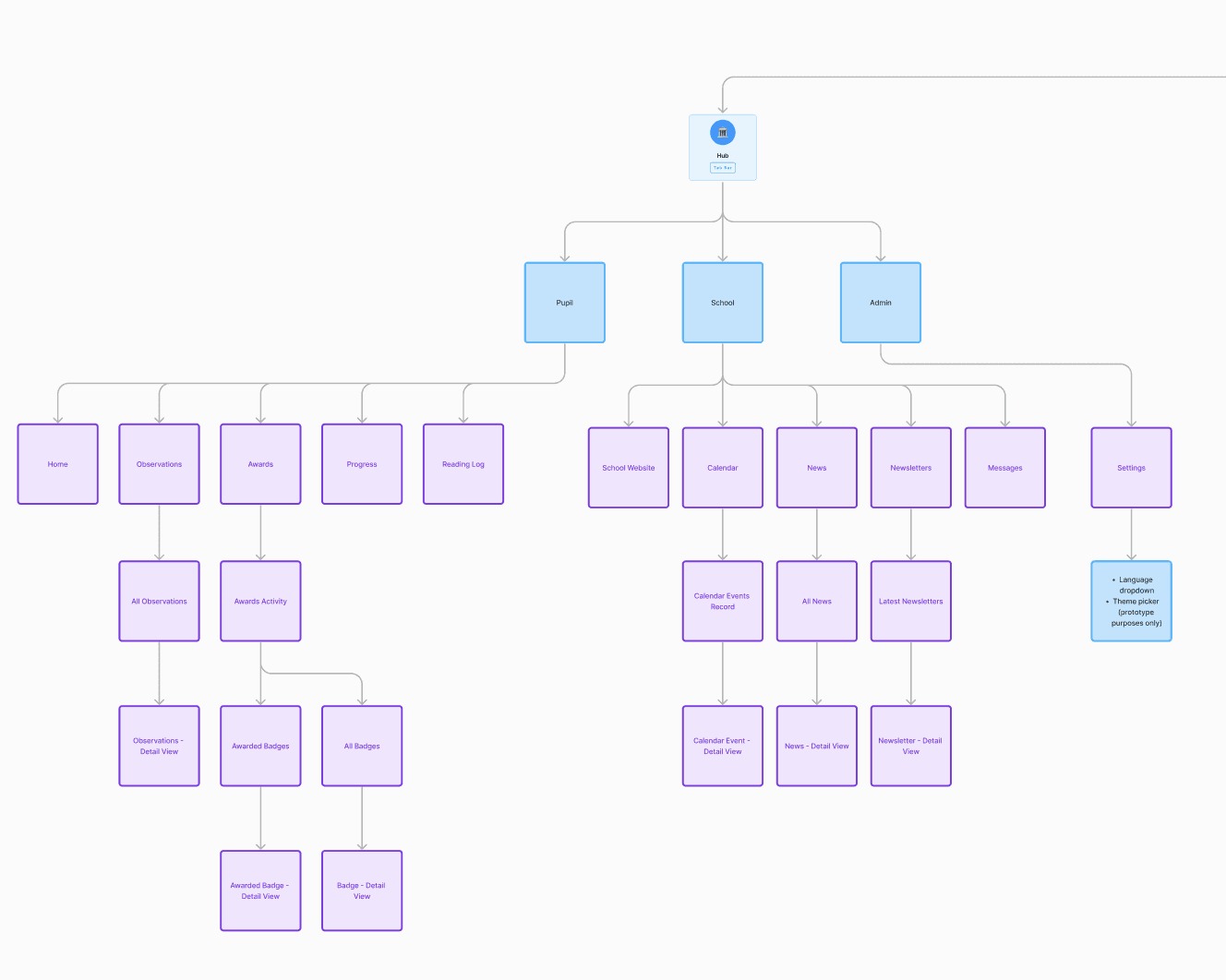
Sitemap and user journey for Parent App
Sketch of Teacher App class view
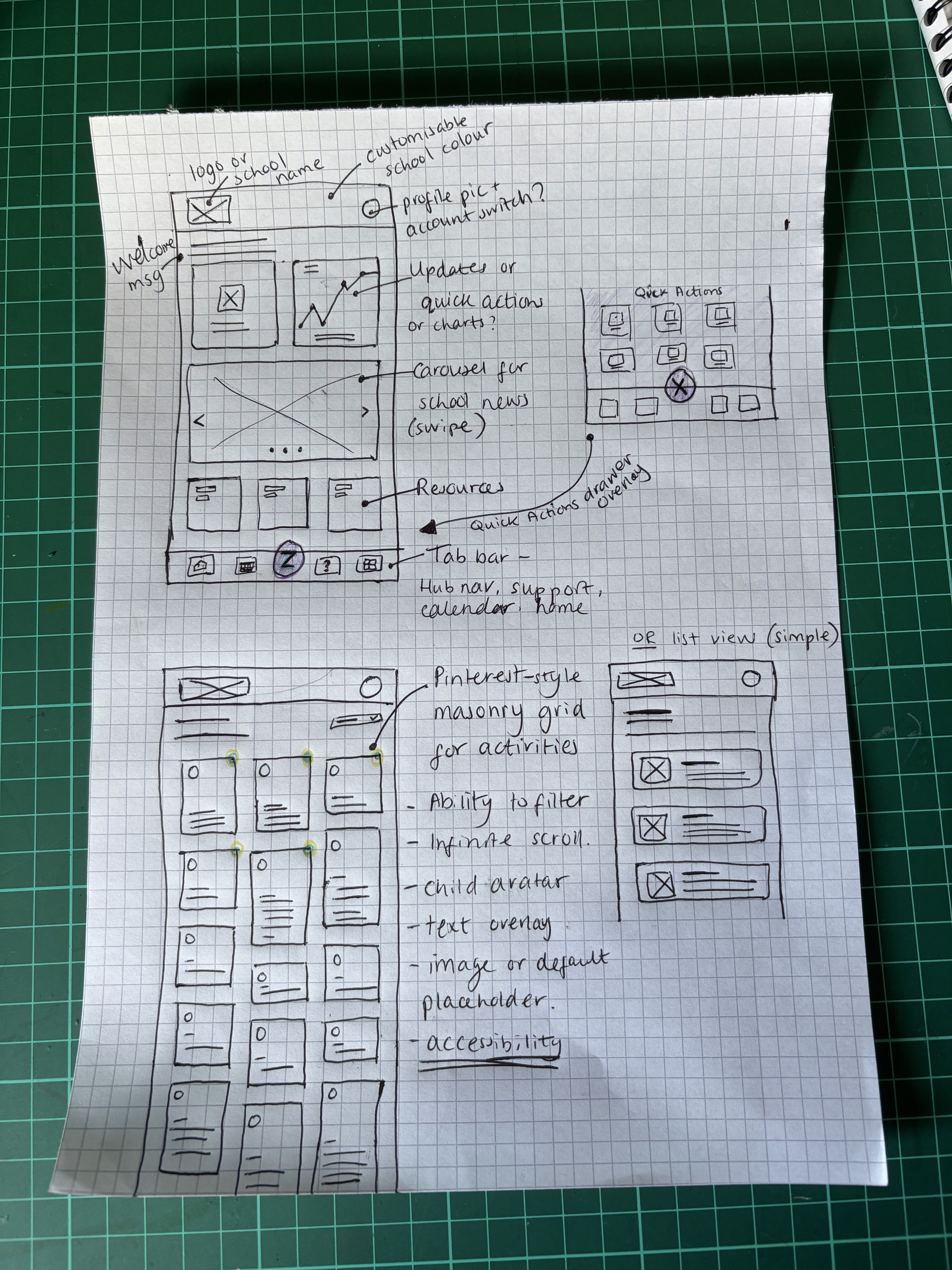
Sketch of mobile app dashboard and masonry grid
Sketch of Teacher App actions to take register and give awards

Outcomes

School updates build trust and enthusiasm
Push notifications make both teachers and parents feel more connected with one another
Interactions via mobile apps receive faster responses from parents

Key Learnings

Simplification is key for efficiency and engagement

Users value a quick and easy process, especially on mobile

Simplification is key for efficiency and engagement

Users value a quick and easy process, especially on mobile

Simplification is key for efficiency and engagement

Users value a quick and easy process, especially on mobile

Iterative testing pays off

Regular testing uncovered hidden issues and ensured the design met user needs.

Iterative testing pays off

Regular testing uncovered hidden issues and ensured the design met user needs.

Iterative testing pays off

Regular testing uncovered hidden issues and ensured the design met user needs.

Share the little wins more often

Sharing little and often reduces mental load on both teachers and parents.

Share the little wins more often

Sharing little and often reduces mental load on both teachers and parents.

Share the little wins more often

Sharing little and often reduces mental load on both teachers and parents.

Select this text to see the highlight effect